The Reports page holds every report in LawnPro in one place. Go to Reports in the left menu to see them grouped into cards. Click any report to open it, then use the date range and filters at the top to narrow it down. Most reports start on January 1 of this year and run through today.
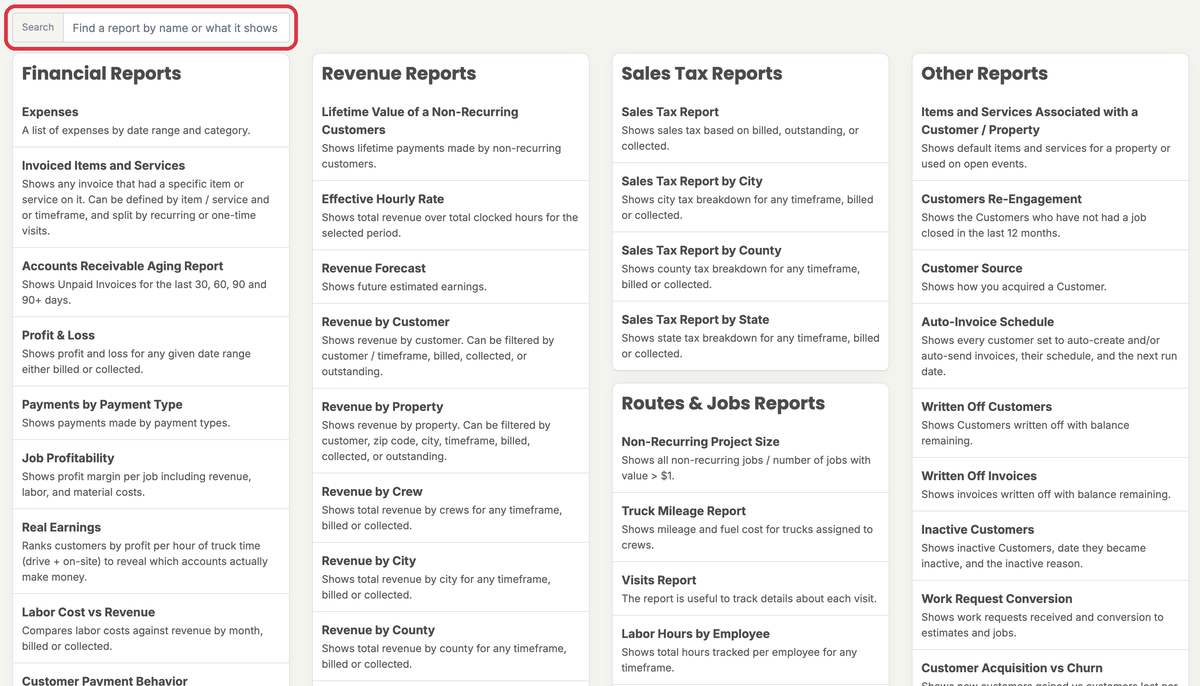
Can’t find a report? Type in the Search box at the top of the page. It matches report names, what each report shows and the group it’s in.
Report names on your screen use your own terminology settings. For example, if you call customers “Clients”, you’ll see Client Source instead of Customer Source. This article uses LawnPro’s default names.
Who can see Reports
- Owners see every report.
- Employees only see the Reports menu if they have Reports access in their permissions.
- Job Profitability, Real Earnings and Labor Cost vs Revenue show labor costs and profit. Employees only see them if Can see profit & labor costs is also checked under Reports in their permissions.
- Customer Scoring is only on the Grow and Plus plans.
Financial Reports
| Report | What it shows | Help article |
|---|---|---|
| Expenses | Your expenses for a date range, filtered by category. | Generate an Expense Report |
| Invoiced Items and Services | Every invoice that includes a chosen item or service. You can filter by timeframe and split recurring from one-time visits. | Generate an Invoiced Items/Services Report |
| Accounts Receivable Aging Report | Unpaid invoices grouped by how overdue they are: 30, 60, 90 and over 90 days. | Generate an Accounts Receivable Aging Report |
| Profit & Loss | Profit and loss for any date range, based on billed or collected amounts. | Generate a Profit and Loss Report |
| Payments by Payment Type | Payments you received, broken out by payment method. | Payments By Payment Type Report |
| Job Profitability | Each completed visit with its revenue, labor cost from time tracking, chemical cost, profit and margin. Filter by customer or crew. | — |
| Real Earnings | Ranks customers or properties by profit per truck hour (time on site plus planned drive time from your routes). Customers with no route data are listed at the bottom without a rank. | — |
| Labor Cost vs Revenue | Revenue and labor cost side by side each month, with gross profit and margin. Filter by crew. | — |
| Customer Payment Behavior | For each customer: invoices sent and total billed, paid and outstanding. It also shows the average, fastest and slowest days to pay. | — |
Estimates Reports
| Report | What it shows | Help article |
|---|---|---|
| Estimates | The estimates you created in a date range, with a status breakdown, total value and conversion rate. Filter by estimate type. | — |
| Time to Close Estimates | How many days your sent estimates took to be accepted or declined, plus your average. | Estimate Close Ratio and Time to Close Reports |
| Estimate Close Ratio | Estimates sent each month compared with the visits scheduled from them. | Estimate Close Ratio and Time to Close Reports |
Revenue Reports
| Report | What it shows | Help article |
|---|---|---|
| Lifetime Value of a Non-Recurring Customers | Total payments in the date range from customers who have never had recurring visits. | — |
| Effective Hourly Rate | Revenue divided by hours clocked for each customer, by month and overall. | — |
| Revenue Forecast | Revenue you can expect from scheduled visits. Filter by customer, crew, employee or service. | Generate a Revenue Forecast |
| Revenue by Customer | Revenue for each customer by month. | Generate a Revenue by Customer Report |
| Revenue by Property | Revenue for each property by month. Filter by customer, city or ZIP code. | — |
| Revenue by Crew | Total revenue for each crew. | Generate a Revenue by Crew Report |
| Revenue by City | Total revenue for each city. | Generate a Revenue by City Report |
| Revenue by County | Total revenue for each county. | Generate a Revenue by County Report |
| Recurring Visits VS Single Visits | Monthly invoice totals from recurring visits next to single visits. | — |
| Recurring Revenue Trend | Each month’s number of active recurring series, plus how many started and ended. | — |
Sales Tax Reports
| Report | What it shows | Help article |
|---|---|---|
| Sales Tax Report | Sales tax based on billed, outstanding or collected amounts. | Generate a Sales Tax Report |
| Sales Tax Report by City | Sales tax by city. | Tax Reports |
| Sales Tax Report by County | Sales tax by county. | Tax Reports |
| Sales Tax Report by State | Sales tax by state. | Tax Reports |
Routes & Jobs Reports
| Report | What it shows | Help article |
|---|---|---|
| Non-Recurring Project Size | Completed, invoiced one-time jobs with each job’s total and your average job size. | — |
| Truck Mileage Report | Miles and fuel cost for trucks assigned to your crews. | Tracking Mileage |
| Visits Report | A list of visits with date, customer, crew, line items, status and revenue. Filter by status, recurring or single, crew and item. | — |
| Labor Hours by Employee | Hours tracked by each employee, with entries, average hourly rate and total pay. | — |
| Crew Utilization | For each crew: jobs, completed, not serviced, completion percentage, hours and revenue. | — |
| Efficiency Report | Budgeted hours divided by actual clocked hours, by day, week, month or total. Filter by employee or crew. | — |
| Budgeted vs Actual Hours | Budgeted and clocked hours side by side for each visit, with an efficiency score. You can open a visit from here to change its budgeted hours. | — |
| Chemical Usage | Every chemical application with product, EPA number, property, rate, amount, applicator, license number, weather and cost. Export it for your state records. | Email a Chemical Application Record and Run the Chemical Usage Report |
Other Reports
| Report | What it shows | Help article |
|---|---|---|
| Items and Services Associated with a Customer / Property | Which customers and properties have each item or service as a default or on an open visit. | Default Items & Services for a Property |
| Customers Re-Engagement | Customers whose last completed job was more than 12 months ago, with contact details. | — |
| Customer Source | How you got your customers. | Customer Source Report |
| Auto-Invoice Schedule | Every customer set to auto-create or auto-send invoices, their next run date and whether anything will go out. | Auto-Invoicing |
| Written Off Customers | Customers you wrote off who still have a balance. | Written Off Customers With Balance Remaining Report |
| Written Off Invoices | Invoices you wrote off. | Written Off Invoices Report |
| Inactive Customers | Inactive customers, when each went inactive and why. | Inactive Customer Report |
| Work Request Conversion | Work requests received each month and the share that became estimates and jobs. | — |
| Customer Acquisition vs Churn | New customers each month next to customers who went inactive, with the net change. | — |
| Customer Scoring | Customer health scores and who’s at risk of leaving. Grow and Plus only. | Customer Scores |
| Email/SMS Engagement | Emails sent and opened each month with your open rate, plus texts sent and received with your response rate. | — |
| User Activity | Invoices, estimates, payments and completed jobs by each employee. | — |