ACH lets your customers pay by bank transfer instead of by card. ACH is included on the Grow and Plus plans. On Solo and Startup it’s a $15/month add-on. For fees, see Credit Card Processing Fees.
Before you start: online payments must be set up (Settings > Setup & Manage Online Payments), and Accept ACH Payments must be turned on in your settings and on the customer’s profile.
Ask your customers to add their bank
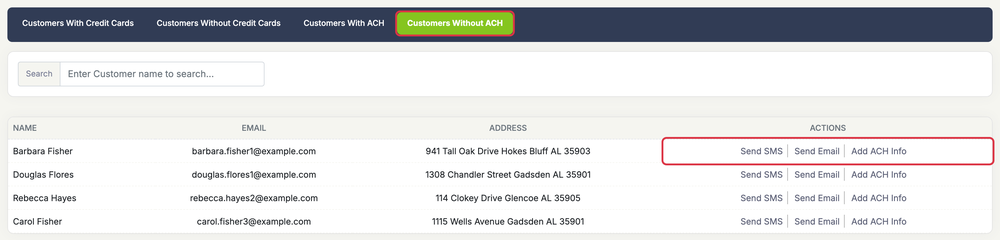
- Go to Customers > Manage Credit Cards. This opens the Manage Credit Cards / ACH page.
- Click the Customers Without ACH tab.
- Next to a customer, click Send SMS or Send Email to send them a link to their portal, or click Add ACH Info to open their profile and add their bank yourself (see below).
How your customer adds their bank
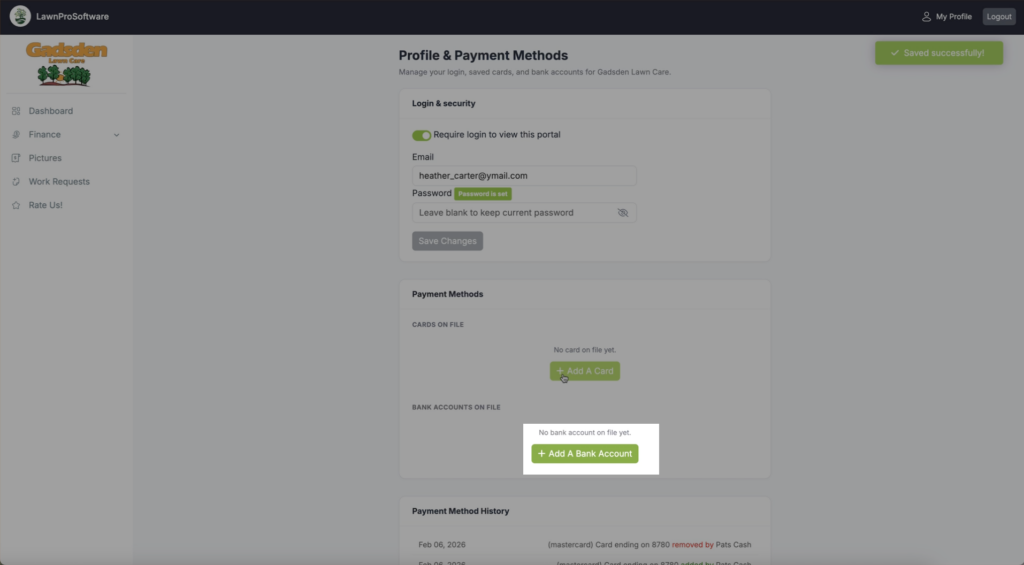
- In their customer portal, they click My Profile at the top right. This opens the Profile & Payment Methods page.
- Under Login & security, they turn on Require login to view this portal, enter their email and a password, and click Save Changes. They can’t add a bank account until login is turned on.
- Under Payment Methods, they add their bank. With LawnPro Payments, they click Add A Bank Account and enter the routing and account numbers. With Stripe, they click Connect Bank Account For ACH to sign in to their bank, or Enter Bank Manually.
- Once the bank account is added and verified, they check Allow [your company] to charge this bank account for services rendered. If this box isn’t checked, you can’t charge the account.
If the bank account needs to be verified, the customer receives two small deposits. They enter the two amounts on My Profile and click Verify Bank Account.
Add a bank account for your customer
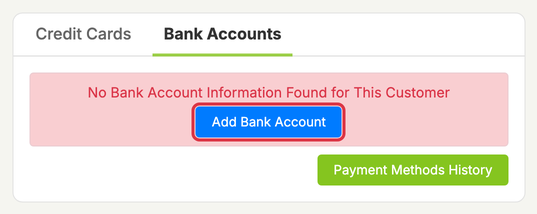
Open the customer’s profile, go to Payment Methods > Bank Accounts, and click Add Bank Account. The account shows Awaiting Customer Verification until the customer confirms it. We email them instructions.
Getting paid by ACH
- Your customer pays: when paying an invoice in their portal, they choose the Bank (ACH) tab.
- You charge it: go to Customers > Charge Cards / ACH On File and click Charge ACH, or add a payment on the invoice.