Table of Contents
What it is
The AI counts plants from the design picture, but it can’t measure the yard. Bed measurements let you enter the real size of each bed so the plant & material list has numbers you can buy against: cubic yards of mulch, feet of bed edging and plant counts that fit the beds.
This is part of LawnPro Design. To open it, go to Tools and then Design in LawnPro.
Enter the beds
- In LawnPro, open Tools and click Design, then open the customer’s project. Make sure the design you want is marked ★ Final design.
- Scroll down to Plant & material list. Bed measurements is at the top.
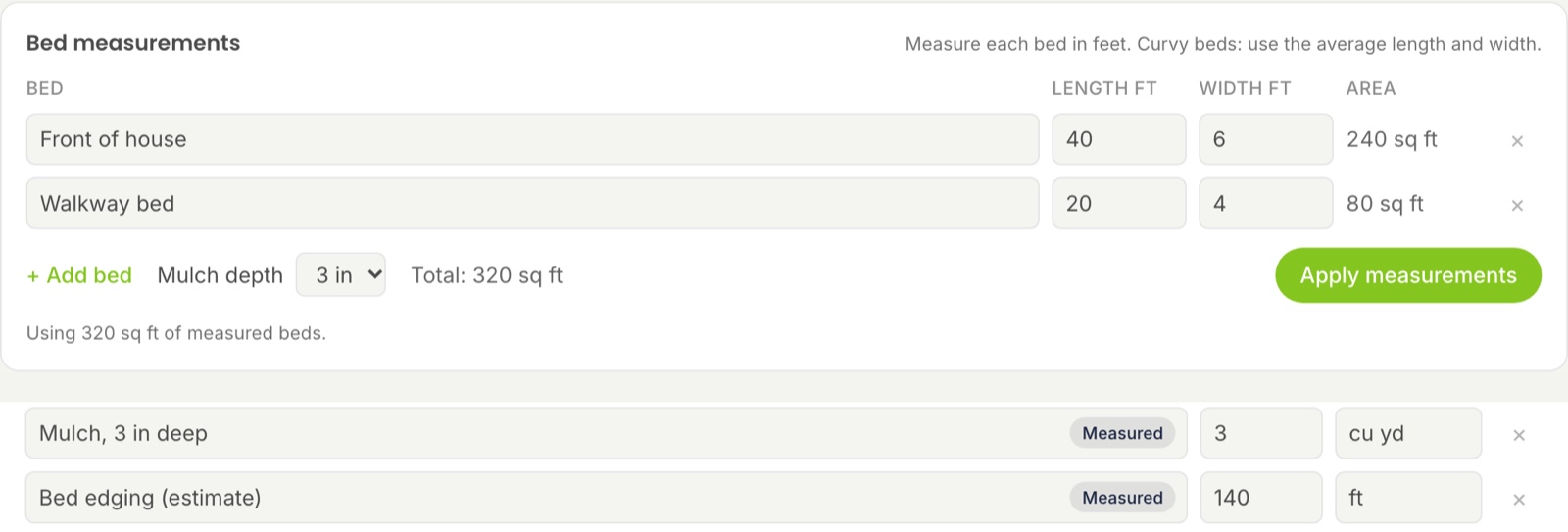
- Type a name for the bed and its length and width in feet. For a curvy bed, use the average length and width.
- Click + Add bed for each other bed. The total square feet updates as you type.
- Pick the Mulch depth: 2, 3 or 4 inches.
- Click Apply measurements. The list saves.
What gets added
- Mulch in cubic yards: the bed area times the depth, divided by 27, rounded up to a whole yard.
- Bed edging (estimate) in feet: the full outline of every bed. Change it if some edges don’t need edging.
- Plant counts scaled to the measured beds. The AI’s counts set the mix and each plant’s spacing sets the total. Trees keep their count.
Mulch and edging lines have a grey Measured tag.
Good to know
- Change the beds and click Apply measurements again. The Measured lines are replaced, not added twice.
- Lines you typed yourself and lighting lines aren’t changed.
- Any edits you haven’t saved yet are kept when you apply.
- Everything on the list goes to the estimate when you create one from the design in LawnPro.